CyteArc reads common single-cell count formats, writes a Zarr store for analysis, and exports counts or metadata to interoperable formats.
Most imports follow the same pattern: inspect when the source layout can vary, open a reader, then call a matching *ToZarr writer.
| Source | Inspect | Reader | Writer |
|---|---|---|---|
| 10x HDF5 | (inferred by reader) | CrH5Reader | CrToZarr |
| Matrix Market / MEX | inspect_mtx | MtxReader | MtxToZarr |
| AnnData H5AD | inspect_h5ad | H5adReader | H5adToZarr |
| Seurat RDS | inspect_seurat | SeuratReader | SeuratToZarr |
| Dense CSV | CSVReader | CSVtoZarr | |
| SciPy CSR | SparseToZarr |
Export paths write Matrix Market or H5AD.
CyteArc does not write Seurat .rds or .h5seurat files.
See CyteArc for Scanpy users or CyteArc for Seurat users for ecosystem-specific workflow mapping.
Start with the Matrix Market example below. The later sections cover other input formats and show how to keep supplied analysis results or handle a larger import.
Download example datasets
CyteArc hosts example datasets in the public CyteBase bucket in formats such as MTX, 10x HDF5, and H5AD.
Connect to the cytearc_docs repository to download them:
# Manage local file and directory paths.
from pathlib import Path

# Create temporary directories for this example.
from tempfile import TemporaryDirectory

# Work with numeric arrays and cell masks.
import numpy as np

# Summarize inspected files and matrices in tables.
import pandas as pd

# Open count stores and run CyteArc analyses.
import cytearc

# Keep routine logs and progress bars out of the results.
cytearc.configure_output(level="ERROR", progress=False)

# Connect to the public example-data repository.
datasets = cytearc.cytebase.connect("cytearc_docs")

# Keep this tutorial's temporary files together.
outputs = TemporaryDirectory()

# Use the temporary directory for downloads and conversions.
output_dir = Path(outputs.name)

# Show the local path used by this step.
output_dirPosixPath('/tmp/tmplrmhq0t2')Started: 2026-10-11T18:54:49.461348Z | Wall time: 2.016 s
Naming format: <author>_<number of cells>_<cell/tissue type or species>_<single-cell method>
Each download returns the directory it wrote, which the readers below use as their input path.
# Download the Matrix Market example.
mtx_dir = datasets.download_dataset(
    name="xin_1K_pancreas_rnaseq",
    destination=output_dir,
)

# Show the local path used by this step.
mtx_dirPosixPath('/tmp/tmplrmhq0t2/xin_1K_pancreas_rnaseq')Started: 2026-10-11T18:54:51.481750Z | Wall time: 1.965 s
This tutorial writes downloads and converted stores below one temporary directory. Replace
output_dir with a persistent project directory in your own workflow.
Import Matrix Market
A Matrix Market import needs three matching files: the count matrix, feature identifiers,
and cell barcodes. inspect_mtx finds complete triplets and reports their dimensions. If the
source contains both raw and filtered matrices, compare the candidates and choose which cells
to import; inspection does not make that choice for you.
A source can be an .mtx or .mtx.gz file, a directory, or a direct MEX ZIP.
Inspection recognizes canonical 10x names, common prefixed triplets, and Parse DGE directories.
# Find complete matrix, feature, and cell-file triplets.
candidates = cytearc.inspect_mtx(str(mtx_dir))

# Compare the candidate files and dimensions without repeating the download path.
pd.DataFrame(
    {
        index: {
            "matrix file": str(Path(candidate.matrixPath).relative_to(mtx_dir)),
            "feature file": str(Path(candidate.featurePath).relative_to(mtx_dir)),
            "cell file": str(Path(candidate.cellPath).relative_to(mtx_dir)),
            "orientation": candidate.matrixOrientation,
            "cells": candidate.nCells,
            "features": candidate.nFeatures,
            "stored entries": candidate.nEntries,
        }
        for index, candidate in enumerate(candidates)
    }
).rename_axis(columns="candidate")| candidate | 0 |
|---|---|
| matrix file | matrix.mtx.gz |
| feature file | features.tsv.gz |
| cell file | barcodes.tsv.gz |
| orientation | featuresByCells |
| cells | 1600 |
| features | 39846 |
| stored entries | 9160987 |
Started: 2026-10-11T18:54:53.450904Z | Wall time: 0.924 s
This directory contains one complete matrix. Open its reader, choose an output path, and call
dump() to write the CyteArc store. If your inspection finds several candidates, choose the one
whose cells and counts you want to analyse:
# Choose where to write the converted Matrix Market store.
mtx_store = output_dir / "xin_1K.zarr"

# Open a reader for the selected source format.
reader = cytearc.MtxReader(candidates[0])

# Write the converted count store.
cytearc.MtxToZarr(reader, zarr_loc=str(mtx_store)).dump()

# Show the path of the converted Matrix Market store.
mtx_storePosixPath('/tmp/tmplrmhq0t2/xin_1K.zarr')Started: 2026-10-11T18:54:54.379141Z | Wall time: 13.878 s
Open the store and inspect its cells and features:
# Open the converted Matrix Market store.
ds_mtx = cytearc.DataStore(str(mtx_store))

# Inspect the opened store's cells and features.
ds_mtx
DataStore has 1600 (1600) cells with 1 assays: RNA
Cell metadata:
'I', 'ids', 'names', 'RNA_nCounts', 'RNA_nFeatures',
'RNA_percentRibo'
RNA assay has 39846 features and following metadata:
'I', 'ids', 'names', 'dropOuts', 'feature_type',
'nCells'Started: 2026-10-11T18:55:08.260615Z | Wall time: 3.178 s
The store is ready for analysis. Continue with Identify PBMC populations with scRNA-seq for an RNA workflow, or read on if you need another input format.
Parse DGE directories
Parse DGE matrices use cells by genes orientation and require cell_metadata.csv.
CyteArc imports its non-ID columns.
It recognizes bc_wells and bc_index; pass cell_id_key when both are present:
# Select the Matrix Market triplet in the Parse directory.
candidate = cytearc.inspect_mtx("/path/to/parse_dge")[0]

# Open a reader for the selected source format.
reader = cytearc.MtxReader(candidate, cell_id_key="bc_index")

# Write the converted count store.
cytearc.MtxToZarr(reader, zarr_loc="parse.zarr").dump()
Import H5AD
H5AD files vary in where they store counts, feature names, metadata, and layers.
Inspect the file before conversion rather than assuming X, obs, and var contain the intended values.
# Download the pancreas H5AD example.
h5ad_dir = datasets.download_dataset(
    name="bastidas-ponce_4K_pancreas-d15_rnaseq",
    destination=output_dir,
)

# Locate the H5AD file to inspect.
h5ad_path = str(h5ad_dir / "data.h5ad")

# Inspect the available count matrices and metadata.
inspection = cytearc.inspect_h5ad(h5ad_path)

# Review the source matrices, dimensions, and metadata.
pd.Series(
    {
        "selected matrix": inspection.matrixKey,
        "available matrices": ", ".join(inspection.matrixCandidates),
        "encoding": inspection.matrixEncoding,
        "integer-like counts": inspection.integerLike,
        "cells": inspection.nCells,
        "features": inspection.nFeatures,
        "cell metadata": inspection.cellAttrsKey,
        "feature metadata": inspection.featureAttrsKey,
        "feature names": inspection.featureNameKey,
    },
    name="value",
).to_frame()| value | |
|---|---|
| selected matrix | X |
| available matrices | X, layers/spliced, layers/unspliced |
| encoding | csr |
| integer-like counts | True |
| cells | 3696 |
| features | 27998 |
| cell metadata | obs |
| feature metadata | var |
| feature names | index |
Started: 2026-10-11T18:55:11.442110Z | Wall time: 3.445 s
H5adReader.from_inspect uses the discovered matrix and metadata keys.
Override the inspection only after confirming that another layer contains the raw count matrix required by the analysis.
This file also contains a UMAP and cell-type labels; other H5AD files may lack these results.
Here we ask the reader to keep them with
embedding_roles and cluster_keys, so we can plot and export them later. Omit these two
arguments for a counts-and-metadata import.
# Open a reader for the selected source format.
reader = cytearc.H5adReader.from_inspect(
    inspection,
    embedding_roles={"X_umap": "umap"},
    cluster_keys=("clusters",),
)

# Choose the output path for the pancreas store.
pancreas_store = output_dir / "differentiating_pancreatic_cells.zarr"

# Import counts and the explicitly selected analysis results.
h5ad_import = cytearc.H5adToZarr(
    reader,
    zarr_loc=str(pancreas_store),
    analysis_assay="RNA",
).dump()

# Inspect the imported UMAP and cluster references.
{
    "embeddings": dict(h5ad_import.embeddingArtifacts),
    "clusters": dict(h5ad_import.clusterArtifacts),
}
{'embeddings': {'X_umap': ArtifactRef(assay='RNA', kind='embedding', artifact_id='2b4e5aa2d4a8...')},
'clusters': {'clusters': ArtifactRef(assay='RNA', kind='cluster_labels', artifact_id='cc678fc36a0b...')}}Started: 2026-10-11T18:55:14.891046Z | Wall time: 3.005 s
embedding_roles and cluster_keys select analytical values for artifact import.
The result maps their source names to exact refs in embeddingArtifacts and clusterArtifacts.
These values are not flattened into live cell metadata. Load them through the datastore or pass
their refs directly to consumers. Sparse, non-numeric, or row-mismatched selected embeddings are
rejected.
For a file with several assay types, pass assay_split_key to the writer to split them;
from_inspect alone writes one assay. The Import and export API reference covers
multi-assay imports and metadata handling.
Import a larger 10x HDF5 dataset
CyteArc stores data as dense, compressed chunks in Zarr.
CrH5Reader and CrToZarr convert Cell Ranger HDF5 into that layout.
Assay type is inferred from the H5 feature types (RNA, ATAC, or multimodal).
mem_budget bounds the memory the conversion plans for.
The default count shards of this 89,796-peak assay do not fit mem_budget="8G", so the import
passes the smaller policy that its MemoryError names. Non-RNA assays write no countsT
copy, so the smaller shards do not slow later countsT reads.
# Choose count shards that fit the import memory budget.
from cytearc.storage.count_matrix import CountMatrixPolicy

# Download the 10x ATAC count file.
tenx_h5 = datasets.download_dataset(
    name="tenx_10K_pbmc-v1_atacseq",
    destination=output_dir,
)

# Choose the output path for the ATAC store.
atac_store = output_dir / "pbmc_atac.zarr"

# Open a reader for the selected source format.
reader = cytearc.CrH5Reader(str(tenx_h5 / "data.h5"))

# Write the converted count store.
cytearc.CrToZarr(
    reader,
    zarr_loc=str(atac_store),
    mem_budget="8G",
    policy=CountMatrixPolicy(unitBytes=500_000_000, chunkBytes=50_000_000),
).dump()

# Show the path of the converted ATAC store.
atac_storePosixPath('/tmp/tmplrmhq0t2/pbmc_atac.zarr')Started: 2026-10-11T18:55:17.899165Z | Wall time: 12.160 s
Open the written store. The summary lists an ATAC assay, which confirms that inference from the H5 feature types survived the dump:
# Open the converted ATAC store.
ds_atac = cytearc.DataStore(str(atac_store))

# Inspect the opened store's cells and features.
ds_atac
DataStore has 8728 (8728) cells with 1 assays: ATAC
Cell metadata:
'I', 'ids', 'names', 'ATAC_nCounts', 'ATAC_nFeatures'
ATAC assay has 89796 features and following metadata:
'I', 'ids', 'names', 'derivation', 'dropOuts',
'feature_type', 'genome', 'nCells'Started: 2026-10-11T18:55:30.062691Z | Wall time: 0.258 s
Import Seurat RDS
CyteArc can import a serialized Seurat object from an .rds file through inspect_seurat, SeuratReader, and SeuratToZarr.
This path reads the on-disk RDS document.
It does not attach to a live R session, and it does not read .h5seurat.
Inspect first. The result reports which assays and reductions are importable, their dimensions, and any blocking diagnostics or notices:
# Open count stores and run CyteArc analyses.
import cytearc

# Inspect the available count matrices and metadata.
inspection = cytearc.inspect_seurat("pbmc.rds")

# Compare the active assay with the importable assays and reductions.
{
    "active assay": inspection.activeAssay,
    "importable assays": [assay.name for assay in inspection.assays if assay.importable],
    "importable reductions": [r.name for r in inspection.reductions if r.importable],
}
Open a reader for the assays and reductions you want, then write the Zarr store.
Omitting reductions selects every available reduction; SeuratToZarr raises if any selected reduction is not importable.
Pass an empty sequence to skip reductions, or pass only importable names to import a subset.
SeuratToZarr prepares and reads each selected count layer once when it is created, so the
integral counts that Seurat holds as R doubles are stored unsigned, and each assay gets its own
count dtype and layout:
# Open the requested Seurat assays and reductions.
with cytearc.SeuratReader(
    "pbmc.rds",
    assays=["RNA"],
    reductions=["pca"],
) as reader:

    # Import the selected Seurat assays and reductions.
    result = cytearc.SeuratToZarr(reader, zarr_loc="pbmc_from_seurat.zarr").dump()

# Open the count store for this analysis.
ds = cytearc.DataStore("pbmc_from_seurat.zarr")

# Inspect the imported assays, identities, and PCA result.
{
    "assays": result.assayNames,
    "default assay": result.defaultAssay,
    "notices": result.notices,
    "identities": result.activeIdentity,
    "PCA": result.reductionArtifacts["pca"],
}
activeIdentity is an exact cluster-label artifact. reductionArtifacts maps each requested
Seurat reduction name to its exact imported-coordinate ref. Neither result is installed as a live
analysis column. Pass the reduction ref to graph construction or load either payload explicitly.
What this import covers:
Legacy
Assay,Assay5, andChromatinAssaycount layers when their matrix layout is supportedLiteral cell metadata, plus artifact refs for
active.identand selected reductions such as PCA or LSIPartial Assay5 cell membership as per-assay boolean columns (
<assay>_I) when the selected count layers hold only some cells
What it does not import as analysis artifacts:
Neighbour graphs, Seurat
neighborsobjects, images, commands, and mosttoolsslotsNormalized layers when the selected count layer is used for the CyteArc assay
Transposed Assay5 storage (
Assay5T)A return path to
.rdsor.h5seurat(export H5AD or MTX instead)
Pass assay_layers when an assay stores several count layers and you need a non-default choice.
A cell that only an unselected layer holds is recorded as not measured by that assay.
Pass sidecar_path_remaps when a SaveSeuratRds sidecar cache points at moved on-disk matrices.
Prefer original 10x HDF5 or Matrix Market counts when they are available and you only need raw matrices.
Large Assay5 assays can exceed the reader’s index memory budget (256 MiB by default).
inspect_seurat then reports the assay as not importable with the metadata_index_limit
diagnostic, and SeuratToZarr raises the matching SeuratImportError. Raise maxMetadataBytes
through matrix_limits or select fewer count layers with assay_layers.
Export to Matrix Market
Open the H5AD-derived store written in the “Import H5AD” section and load the selected analytical artifacts:
# Open the count store for this analysis.
ds = cytearc.DataStore(str(pancreas_store))

# Load the UMAP coordinates kept during H5AD import.
imported_umap = np.asarray(
    ds.artifacts.load(h5ad_import.embeddingArtifacts["X_umap"])["values"][:]
)

# Load the cluster labels kept during H5AD import.
imported_clusters = np.asarray(
    ds.artifacts.load(h5ad_import.clusterArtifacts["clusters"])["values"][:]
)

# Check the imported coordinate and label dimensions.
imported_umap.shape, imported_clusters.shape
((3696, 2), (3696,))Started: 2026-10-11T18:55:30.323897Z | Wall time: 0.285 s
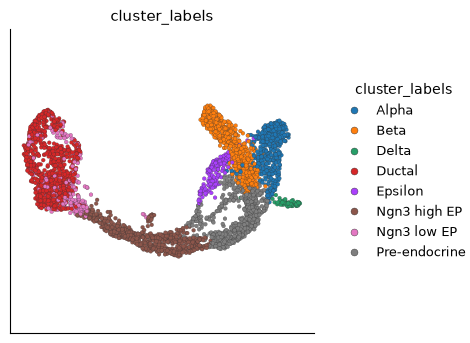
Plot the imported layout colored by the imported cluster labels:
# Plot the imported UMAP using the cluster labels kept from H5AD.
ds.plots.embedding(
    layout=h5ad_import.embeddingArtifacts["X_umap"],
    color_by=h5ad_import.clusterArtifacts["clusters"],
)
Started: 2026-10-11T18:55:30.612289Z | Wall time: 1.618 s
# Choose a directory for the exported Matrix Market files.
mtx_export = output_dir / "diff_pancreas"

# Export the assay counts to Matrix Market files.
cytearc.writers.to_mtx(assay=ds.RNA, mtx_directory=str(mtx_export))

# List the exported files with their sizes in bytes.
[(path.name, path.stat().st_size) for path in sorted(mtx_export.iterdir())]
[('barcodes.tsv', 62832), ('genes.tsv', 417116), ('matrix.mtx', 114507260)]Started: 2026-10-11T18:55:32.234935Z | Wall time: 9.671 s
Export to H5AD and AnnData
DataStore.to_anndata builds an in-memory AnnData object from the selected counts and
metadata. In this example, add the imported UMAP to obsm and cluster labels to obs, then
write that object as H5AD. Those assignments affect the AnnData object and exported file;
they do not change the CyteArc store.
For a completed pipeline, prefer ds.to_anndata(run=run). That form exports the run’s frozen
assay, cell selection, feature selection, and metadata. It rejects live cell_key,
feature_indexes, and feature_names overrides so the exported axes cannot drift from the run.
Attach exact imported artifacts
# Build an AnnData object from the assay.
adata = ds.to_anndata(from_assay="RNA")

# Attach the imported UMAP in AnnData's embedding slot.
adata.obsm["X_umap"] = imported_umap

# Attach the imported cluster labels to AnnData's cell table.
adata.obs["clusters"] = imported_clusters

# Choose the exported H5AD filename.
h5ad_export = output_dir / "diff_pancreas.h5ad"

# Write counts, metadata, and attached results to H5AD.
adata.write_h5ad(h5ad_export)

# Confirm the written filename and its size in bytes.
{"file": h5ad_export.name, "bytes": h5ad_export.stat().st_size}
{'file': 'diff_pancreas.h5ad', 'bytes': 59304360}Started: 2026-10-11T18:55:41.909007Z | Wall time: 2.027 s
Reload the H5AD and confirm that the explicitly attached layout is in obsm:
# Reload the exported H5AD with AnnData.
import anndata as ad

# Reload the exported H5AD to verify its contents.
adata = ad.read_h5ad(h5ad_export)

# Verify the exported embedding name and dimensions.
sorted(adata.obsm.keys()), adata.obsm["X_umap"].shape
(['X_umap'], (3696, 2))Started: 2026-10-11T18:55:43.940652Z | Wall time: 0.158 s
Export a feature panel with to_anndata
Full-assay export can require enough memory and disk for the selected cell by feature matrix. When only a marker panel is needed, select features before materializing AnnData. Resolve the requested display names against the store once, then export only those columns:
# Read the feature names available in the store.
all_names = ds.RNA.feats.fetch_all("names").astype(str)

# Match requested genes without depending on letter case.
name_lookup = {name.upper(): name for name in all_names}

# Resolve the small marker panel against the stored gene names.
panel = [name_lookup[gene] for gene in ("GCG", "SST", "KRT19")]

# Export only the requested features into memory.
selected = ds.to_anndata(from_assay="RNA", matrix="raw", feature_names=panel)

# Check the exported dimensions and gene order.
{
    "shape": selected.shape,
    "genes": selected.var["names"].tolist(),
}
{'shape': (3696, 3), 'genes': ['Gcg', 'Sst', 'Krt19']}Started: 2026-10-11T18:55:44.102779Z | Wall time: 0.315 s
Use feature_indexes instead when stable feature rows are already available.
feature_names and feature_indexes are mutually exclusive, preserve the requested order, and reject duplicate or unknown selections.
This export contains the selected genes’ raw counts and live metadata for cells selected by
I. Omitting the feature selection exports every gene in the assay, while the cell selection
still applies. Saved analytical artifacts are not attached automatically in this form; add the
needed values to the AnnData object as above.
Import CSV
CSVReader and CSVtoZarr provide small-data compatibility for dense CSV count matrices.
The toy matrix below is synthesized in-notebook so the conversion does not depend on a catalog file.
Rows are cells and columns are features; cell_data_cols moves selected columns into cell metadata.
# Choose a filename for the small CSV example.
csv_path = output_dir / "toy_counts.csv"

# Write the small example count table.
csv_path.write_text(
    "quality,geneA,geneB,geneC\n"
    "10,1,0,2\n"
    "20,0,3,0\n"
    "30,4,5,6\n"
    "40,7,0,8\n"
    "50,9,10,0\n",
    encoding="utf-8",
)

# Inspect the example CSV before conversion.
print(csv_path.read_text(encoding="utf-8"))
quality,geneA,geneB,geneC
10,1,0,2
20,0,3,0
30,4,5,6
40,7,0,8
50,9,10,0
Started: 2026-10-11T18:55:44.420870Z | Wall time: 0.007 s
Convert the CSV, keeping quality as cell metadata:
# Choose where to write the converted CSV store.
csv_zarr = output_dir / "toy_csv.zarr"

# Open a reader for the selected source format.
reader = cytearc.CSVReader(
    str(csv_path),
    cell_data_cols=["quality"],
)

# Write the converted count store.
cytearc.CSVtoZarr(reader, zarr_loc=str(csv_zarr), assay_name="RNA").dump()

# Open the converted CSV store.
ds_csv = cytearc.DataStore(str(csv_zarr))

# Inspect the first few rows of the result.
ds_csv.cells.head()| I | ids | names | RNA_nCounts | RNA_nFeatures | quality | |
|---|---|---|---|---|---|---|
| 0 | True | cell_0 | cell_0 | 3.0 | 2.0 | 10 |
| 1 | True | cell_1 | cell_1 | 3.0 | 1.0 | 20 |
| 2 | True | cell_2 | cell_2 | 15.0 | 3.0 | 30 |
| 3 | True | cell_3 | cell_3 | 15.0 | 2.0 | 40 |
| 4 | True | cell_4 | cell_4 | 19.0 | 2.0 | 50 |
Started: 2026-10-11T18:55:44.431276Z | Wall time: 1.079 s
quality is cell metadata rather than a count column, which is what cell_data_cols is for.
Import sparse matrices
SparseToZarr accepts a SciPy CSR matrix with matching cell and feature IDs.
# Construct a small sparse count matrix.
from scipy.sparse import csr_matrix

# Construct a small sparse cell-by-feature count matrix.
mat = csr_matrix(
    (
        [1, 10, 15, 10, 20, 2, 3, 1, 5],
        ([0, 0, 0, 1, 1, 1, 2, 2, 2], [1, 3, 8, 2, 3, 1, 2, 8, 9]),
    ),
    shape=(3, 10),
)

# Display the three-cell toy matrix before conversion.
mat.toarray()
array([[ 0, 1, 0, 10, 0, 0, 0, 0, 15, 0],
[ 0, 2, 10, 20, 0, 0, 0, 0, 0, 0],
[ 0, 0, 3, 0, 0, 0, 0, 0, 1, 5]])Started: 2026-10-11T18:55:45.514327Z | Wall time: 0.008 s
Write this small matrix with matching cell and feature identifiers:
# Choose where to write the sparse-matrix example.
sparse_zarr = output_dir / "toy_sparse.zarr"

# Write the converted count store.
cytearc.SparseToZarr(
    mat,
    zarr_loc=str(sparse_zarr),
    cell_ids=[f"cell_{i}" for i in range(mat.shape[0])],
    feature_ids=[f"feat_{i}" for i in range(mat.shape[1])],
    assay_name="RNA",
).dump()

# Open the converted sparse-matrix store.
ds_sparse = cytearc.DataStore(str(sparse_zarr))

# Inspect the opened store's cells and features.
ds_sparse
DataStore has 3 (3) cells with 1 assays: RNA
Cell metadata:
'I', 'ids', 'names', 'RNA_nCounts', 'RNA_nFeatures'
RNA assay has 10 features and following metadata:
'I', 'ids', 'names', 'dropOuts', 'nCells'Started: 2026-10-11T18:55:45.526443Z | Wall time: 0.434 s
For a complete DataStoreMerge example, continue to Integrating datasets by merging.
Other import paths
Chunked arrays
chunked_to_zarr writes from a CyteArc ChunkedArray when lazy out-of-core conversion is needed.
Remote Zarr destinations
Writers also accept remote Zarr locations.
Choose the cloud profile for an object-store destination and pass credentials through the environment or runtime configuration:
# Read object-store credentials from the environment.
import os

# Inspect the available count matrices and metadata.
inspection = cytearc.inspect_h5ad("counts.h5ad")

# Open a reader for the selected source format.
reader = cytearc.H5adReader.from_inspect(inspection)

# Configure a writer for the remote destination.
writer = cytearc.H5adToZarr(
    reader,
    zarr_loc="s3://my-bucket/project/data.zarr",
    storage_options={
        "access_key_id": os.environ["AWS_ACCESS_KEY_ID"],
        "secret_access_key": os.environ["AWS_SECRET_ACCESS_KEY"],
    },
    profile="cloud",
)

# Write the converted count store.
writer.dump()
Count storage and memory
Writers choose the count dtype from the values, and RNA stores keep both cell-major counts
and gene-major countsT arrays. Start with the default storage layout: if an import cannot fit
its mem_budget, the error names a smaller CountMatrixPolicy that fits, as in the ATAC
example above. Prefer a larger memory budget when your machine allows it, because smaller RNA
shards slow later gene-major reads. See Memory and execution for memory
planning and the Import and export API reference for reader
buffering and storage options.
Common mistakes and limitations
Give every store its own fresh directory outside other stores: Writers raise
FileExistsErrorfor a path holding data andValueErrorfor nested paths likedata.zarr/RNA;overwrite=Truereplaces only an earlier conversion noDataStorehas opened, so delete a prepared store yourself or choose another path.Inspect the source instead of assuming what it holds or that CyteArc can read it: Confirm which H5AD layer contains raw counts before conversion, re-import older RNA stores that lack
countsT, and remember Seurat import covers counts, metadata, and reductions - not neighbour graphs, images, normalized layers, or.h5seurat.CyteArc moves exactly what you select. Stored count dtype follows the values rather than a reader argument; analytical H5AD values become artifacts only when you name
embedding_rolesorcluster_keys; embeddings must be dense, numeric, row-alignedobsmarrays; keepmatrix="raw"unless the receiving method calls for normalized expression; and export a feature panel rather than materializing a full AnnData when a panel answers the question.